For copywriters, designers & creative studios

One calm place to run every client project.

A client portal and work-management suite built just for creatives, and the only one that also protects your workload capacity and forecasts your income.

Launching soon · Founding pricing for early studios

01 /

You're a creative who loves beautiful things, but not business operations.

Scattered client tools

Proposal here, contract there, invoice somewhere else. Each one comes with its own branding and login, so it feels like it's cobbled together rather than a seamless, premium client experience. And let's not get into how much it all adds up to.

Workload uncertainty

You don't have a real view of your workload, so when opportunities come along you end up saying yes to too much, then burn out.

Unpredictable income

Every creative is familiar with the feast-or-famine anxiety, because you can't predict accurately how much you'll get this month. You're always trying to do mental sums, or updating a spreadsheet.

A workflow that feels like an obstacle course

Create on Adobe or Figma. Embed in email. Write email. Get dozens of scattered comments. Get a random file emailed to you. Repeat. Your workflow is several pieces that don't share context easily or smoothly, so you're terrified of dropping the ball on something.

Why another tool?

Most client tools only do half the job.

Some handle the paperwork (proposals, contracts, invoices), then leave you to run the actual work somewhere else. Others handle the coordination (tasks and timelines), but never face your client. Chord does both, in one branded place.

Paperwork
  • Proposals priced options, accepted online
  • Contracts e-signed in the portal
  • Invoices settled right from the portal
  • Branded portal one calm place for clients
Chord on desktop
Chord is both halves, in one place.
Project management
  • Timeline & stages every project, mapped out
  • Tasks & deadlines who owes what, and when
  • Files & approvals tracked against each stage
  • Workload & income capacity + forecasting

Other tools give you one side or the other. Chord is the whole picture.

Only in Chord

Protect your time. Predict your income reliably.

Every other client tool stops at sending the invoice. Chord is the only one that also watches your workload and forecasts your money. It is the part that keeps creative businesses alive.

02 /

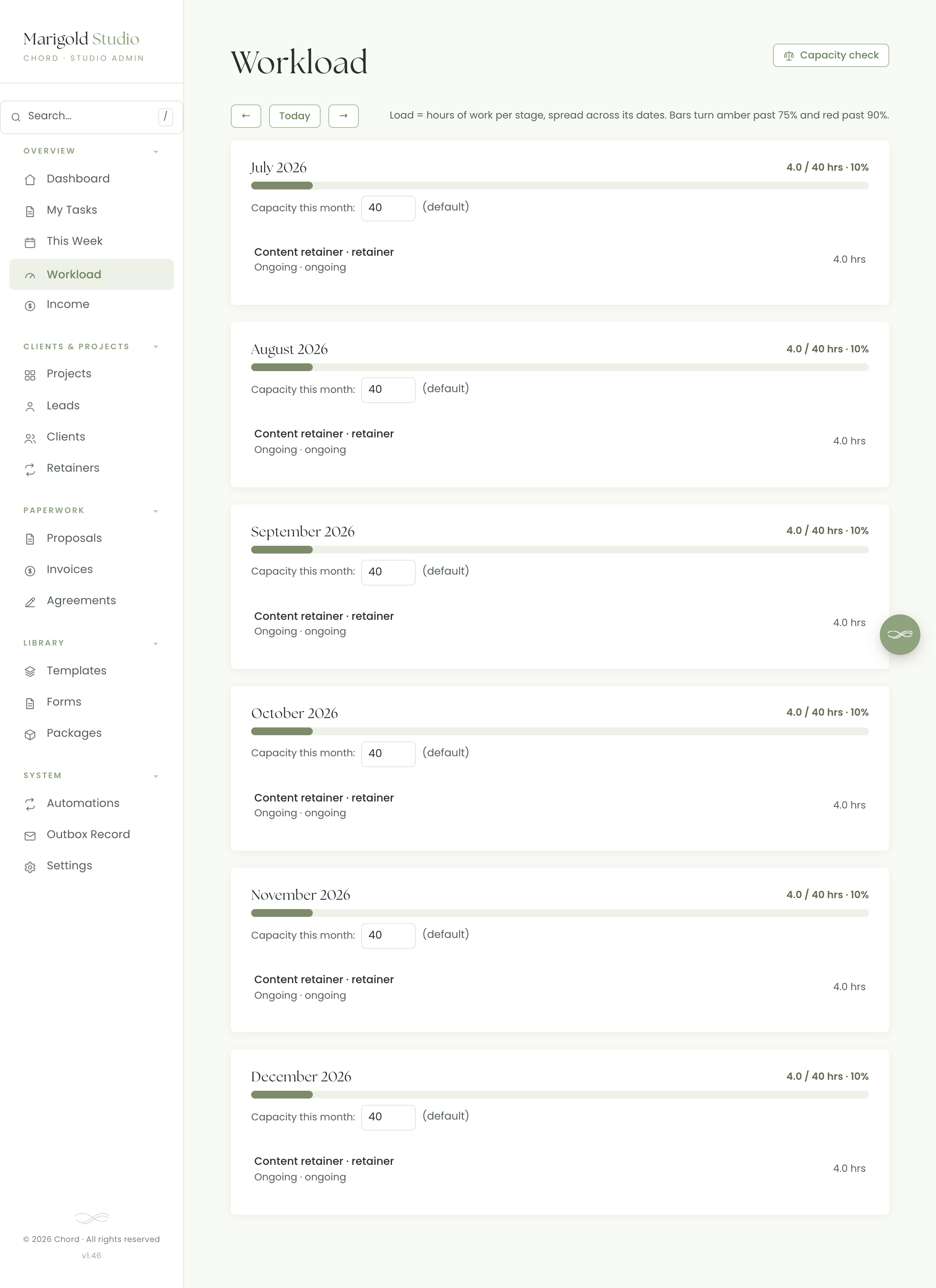
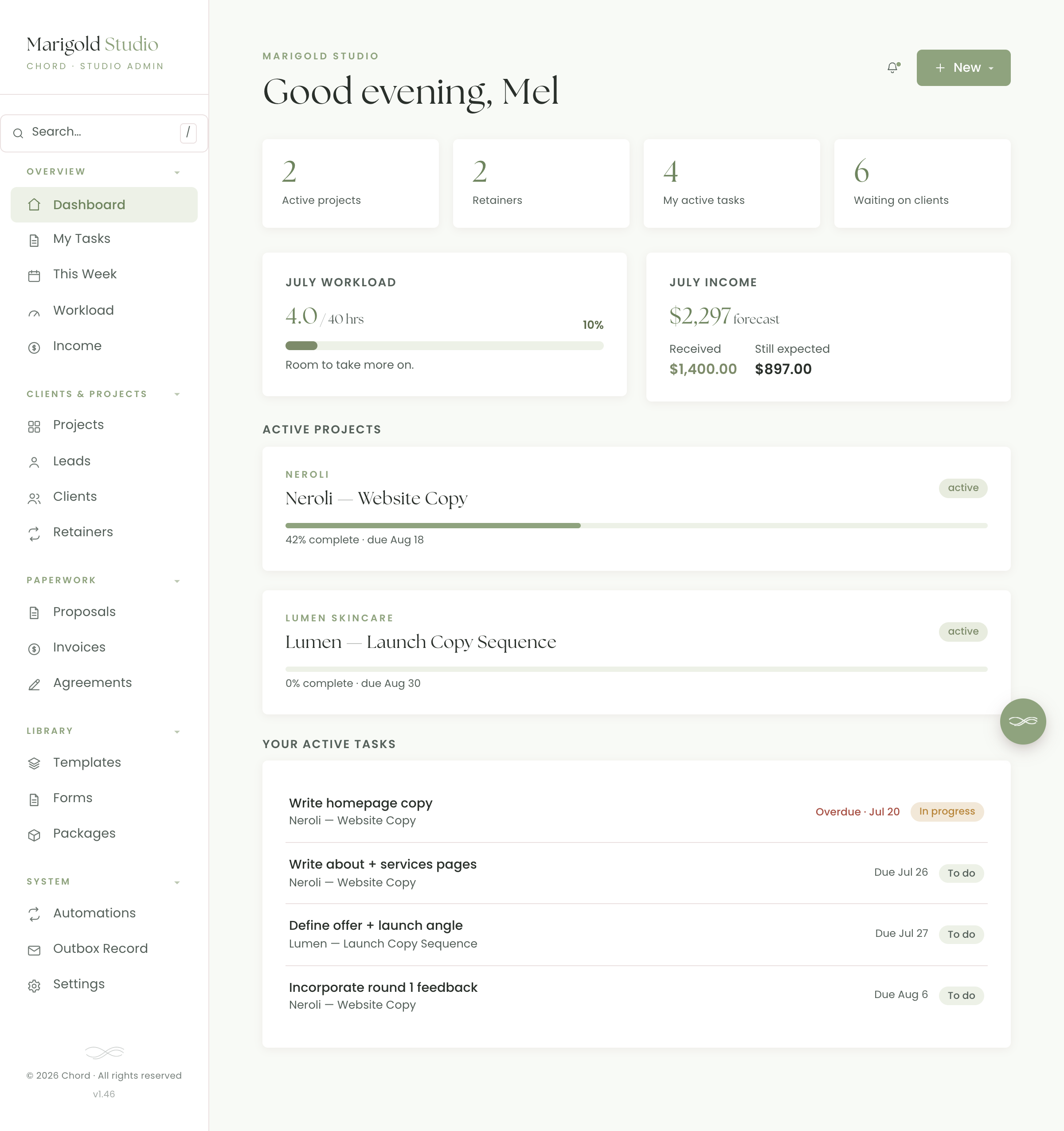
Workload forecast

Chord adds up the hours behind every active project and spreads them across the months, so you can see, at a glance, how full you already are before you commit to anything new.

  • Month-by-month load bars that fill as you book work
  • Amber & red warnings before a month tips over
  • See the crunch early, while you can still move things
work.yourstudio.com · workload
Chord workload forecast, monthly load bars
Real screen · scroll it
03 /

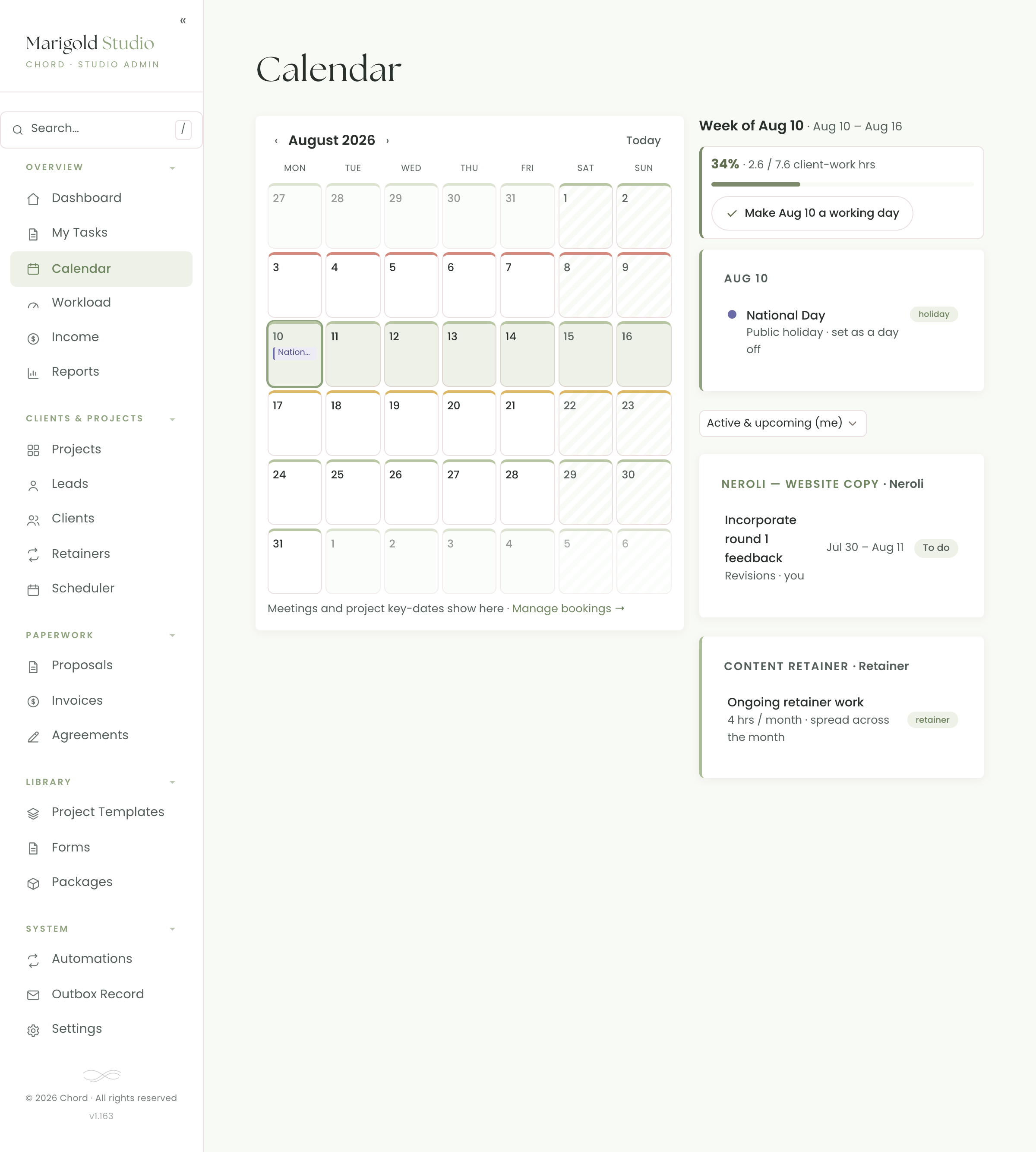
Capacity checker

A new enquiry comes in. Pencil it in with rough hours and a start date, and Chord tells you straight away whether it fits, whether it'll be tight, or when the next real opening is. Say yes with confidence.

  • "Can I take this on?" answered in a tap
  • Finds your next opening when it doesn't fit
  • No more over-promising and quietly drowning
Chord capacity checker
Real tool · scroll it
04 /

Income forecast

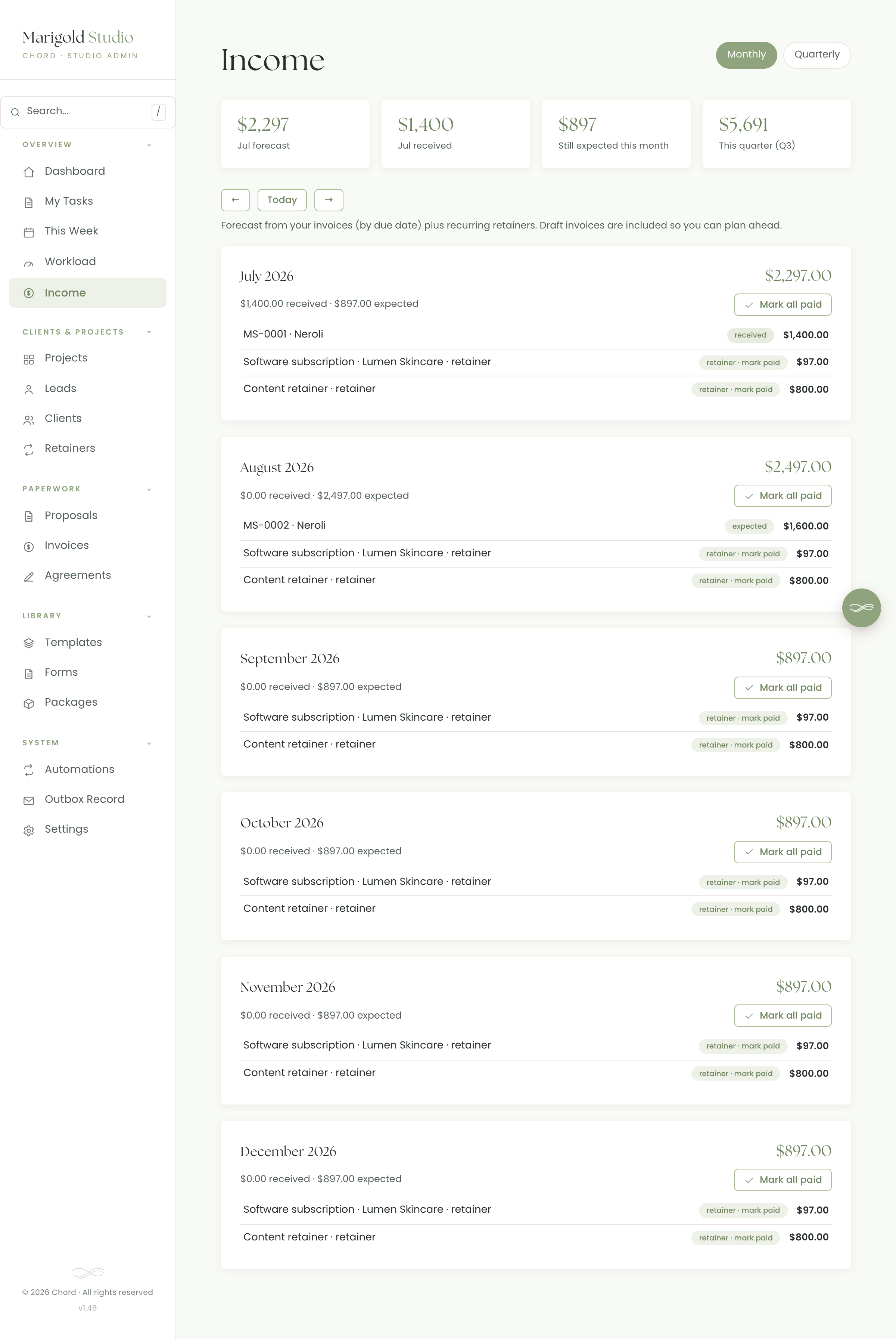
Every invoice and retainer, rolled into a clear month-by-month and quarterly forecast of what's already received and what's still expected. The feast-or-famine finally becomes something you can plan around.

  • Received + still-expected, month by month
  • Quarterly view for the bigger picture
  • Drafts included, so nothing's a surprise
work.yourstudio.com · income
Chord income forecast
Real screen · scroll it

Say yes with your head, not your gut.

On their own, each is useful. Together, the capacity checker and income forecast turn "can I take this on?" into a calm, logical decision. See exactly how a new project fits across your months, and what it does to your income, before you commit.

Especially freeing if you find it hard to say no, or you second-guess every yes. Chord gives you a clear, factual answer to lean on.

05 /

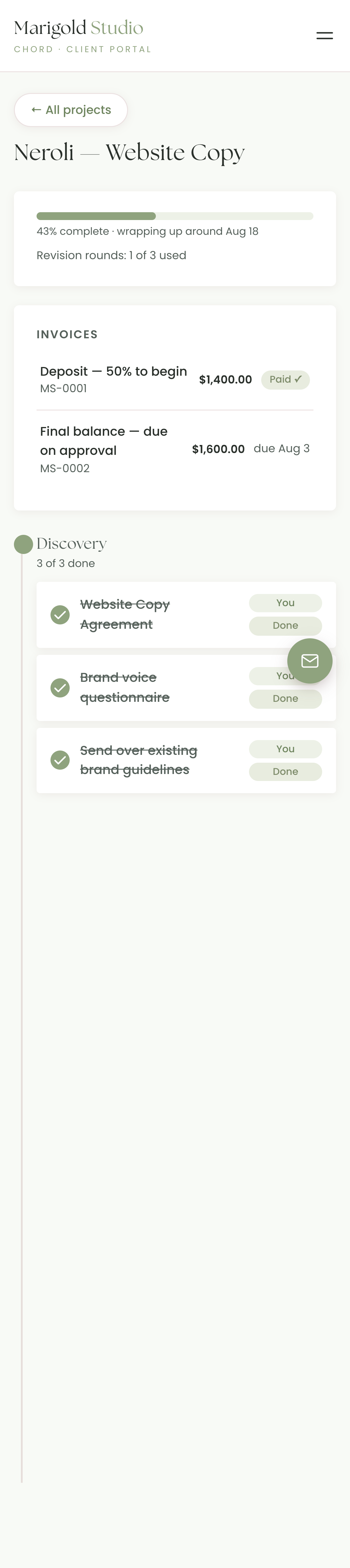
A portal your clients actually open.

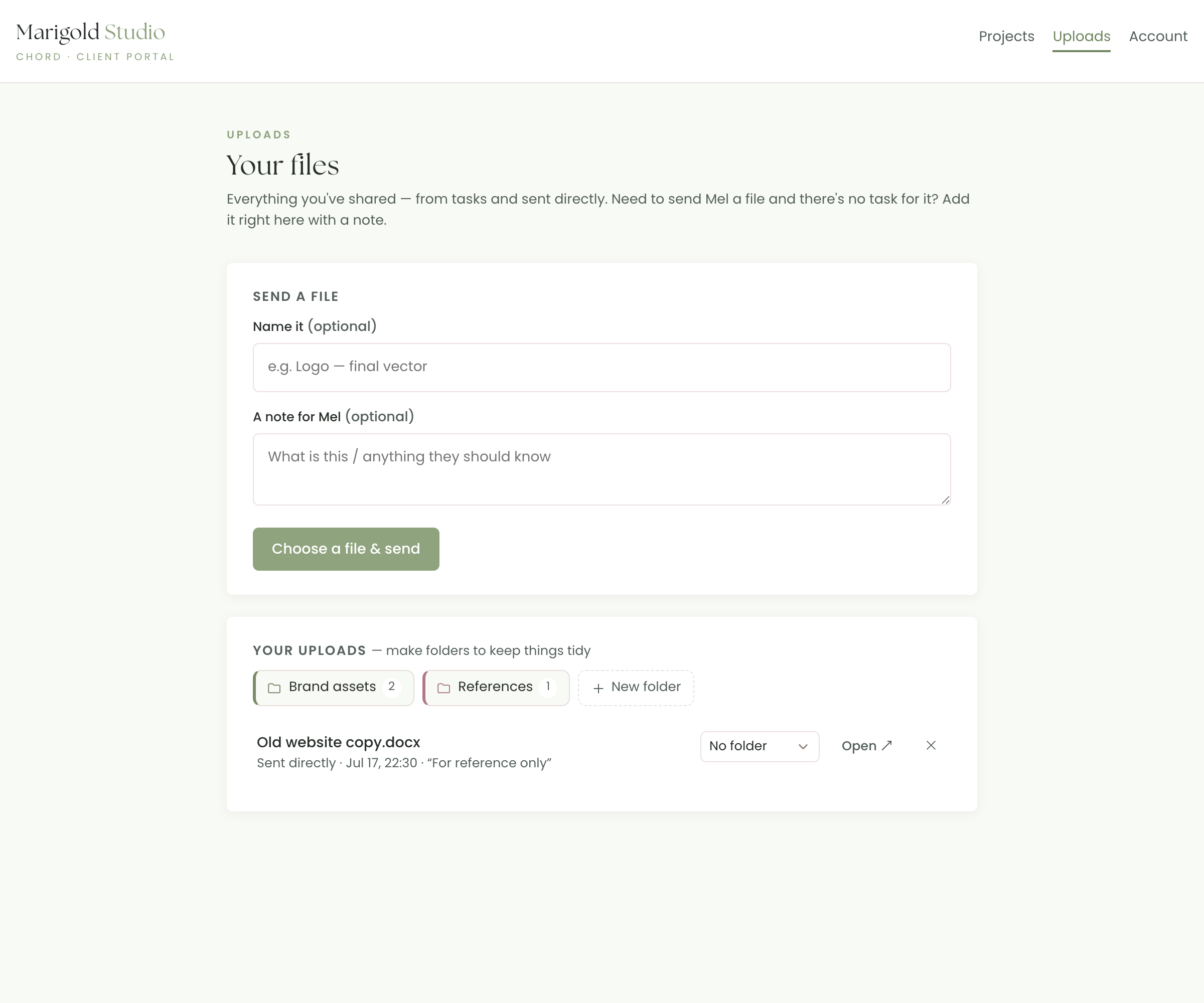
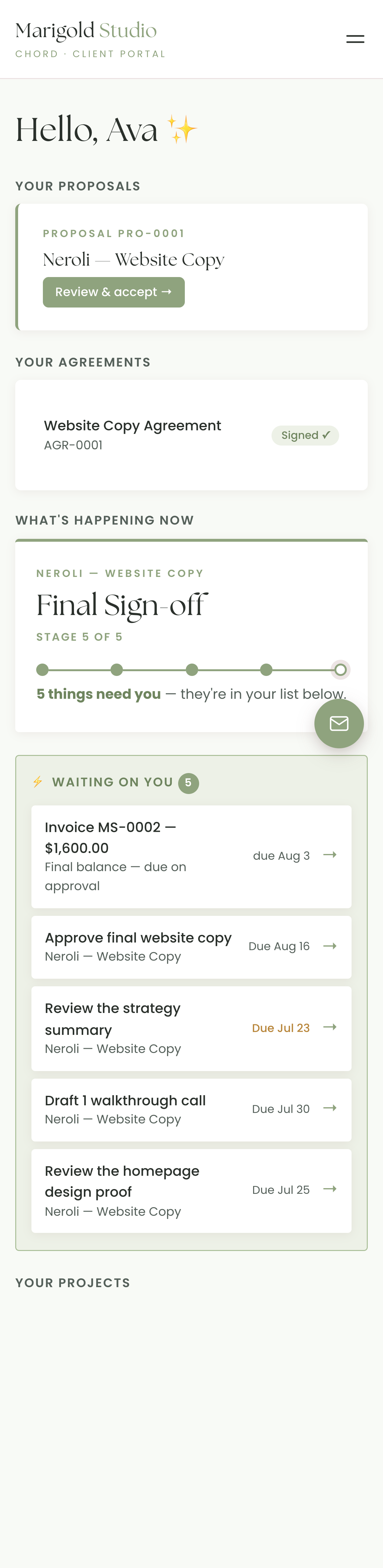
One branded link, no password, no app to learn. Your client taps it and instantly sees where the project stands and the one thing waiting on them, on the phone that's already in their hand.

  • A "waiting on you" list so nothing needs chasing
  • A live timeline of what's done, happening now, and coming next
  • Your logo & colours on every page they touch
Client portal waiting-on-you list and timeline
Real screen · scroll it
06 /

Contracts & approvals, right in the portal.

The agreement, the tasks, the sign-offs, all in the same branded space. Your client signs electronically, approves the proof, and moves the project forward without a single "can you resend that?"

  • E-signatures built in, so there’s no separate signing tool
  • Approvals & uploads where the client already is
  • Upcoming steps shown early, so clients see the whole plan
A project inside the client portal
Real screen · scroll it
07 /

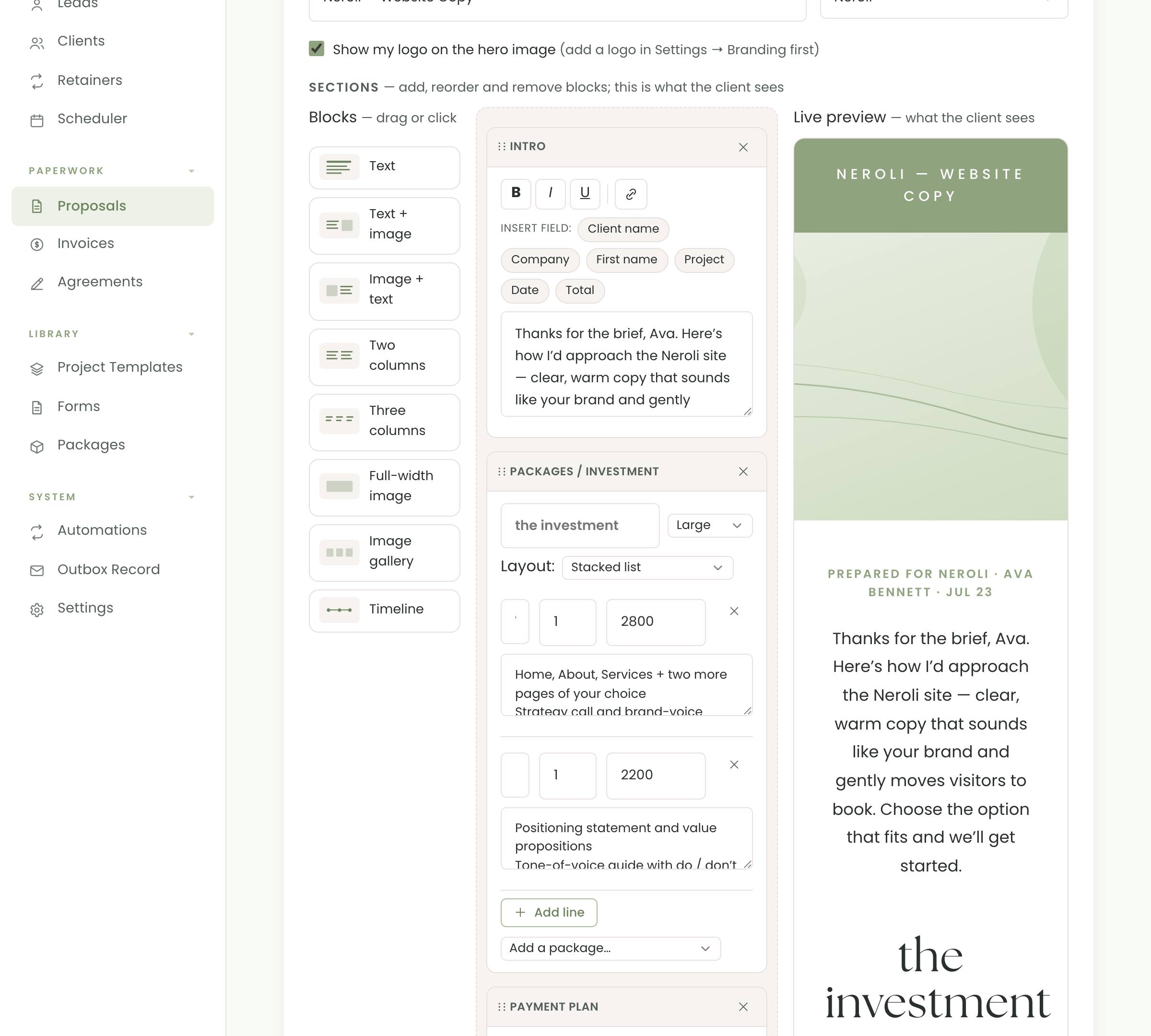
Send a proposal that gets a yes.

Package your work into clear, priced options, with the option to continue a seamless flow with the agreement and invoice all on one screen. Protect access with a unique passcode for a premium experience.

  • Branded and beautiful, with a header image you upload yourself, packages you can customise, timeline and FAQ
  • Accept online, with no printing and no PDF ping-pong
  • Client accepts there and then, or clicks a button to request changes. No more back-and-forth emails.
neroli.yourstudio.com · proposal
A real Chord proposal with header image, packages and pricing
Real proposal · scroll it
08 /

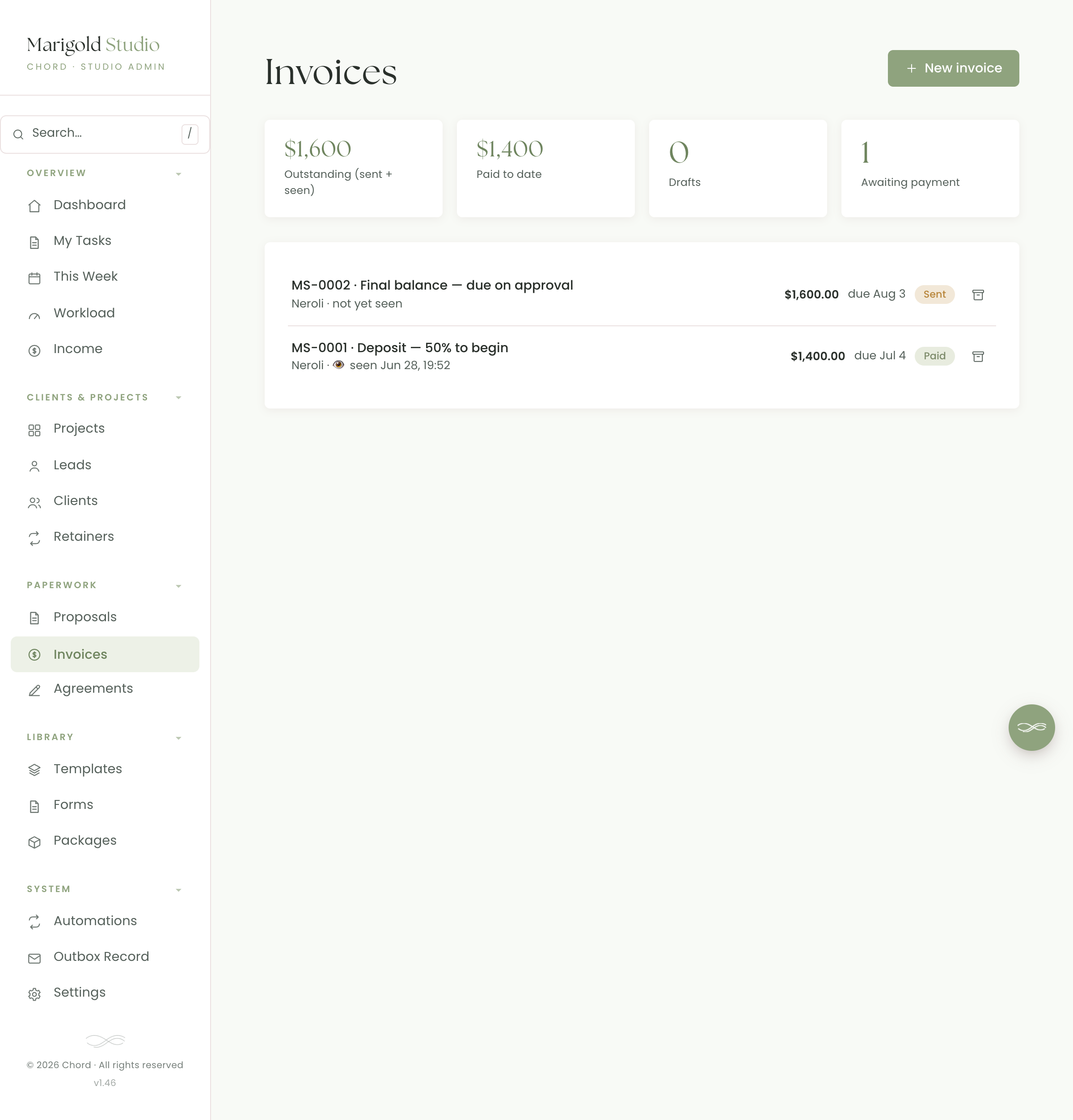
Get paid without the awkward follow-up.

Send a branded invoice with your own pay-online link (PayPal, Stripe, Wise or bank transfer) and the option to add a QR code so clients settle up right from the portal. Once paid, it's lined up in your dashboard for you to check and recorded in your monthly income forecast.

  • Pay online via your own PayPal / Wise link
  • Tied to your monthly income forecast so you don't have to update a spreadsheet
  • Retainers for the clients you bill every month
work.yourstudio.com · invoices
Chord invoices list
Real screen · scroll it
09 /

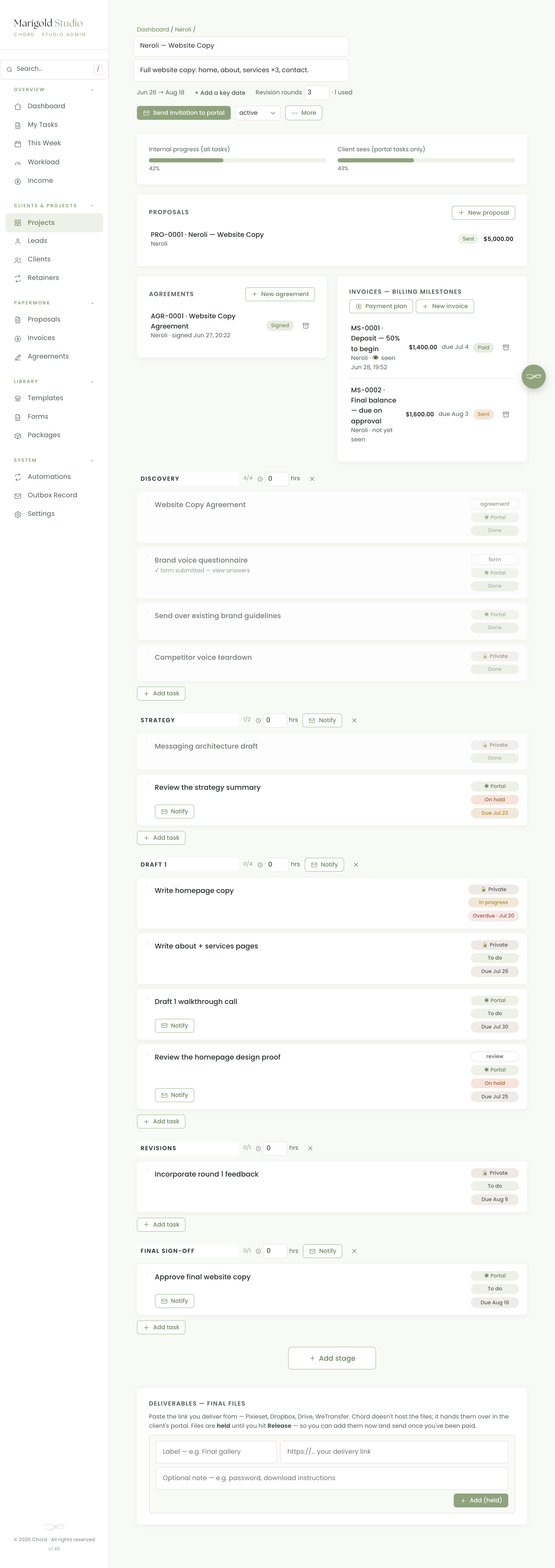
Run the whole project from one dashboard.

Stages, tasks, deadlines, files and every client touch, laid out as a timeline you actually enjoy looking at. Reveal the next step when you're ready, nudge the client with one tap, and always know where things stand.

  • Stage-by-stage timeline for every project
  • One-tap "notify" when a step is ready
  • Files & approvals tracked against each stage
work.yourstudio.com · project
A Chord project page with stages, tasks and timeline
Real screen · scroll it
10 /

Proof the work, cap the revisions.

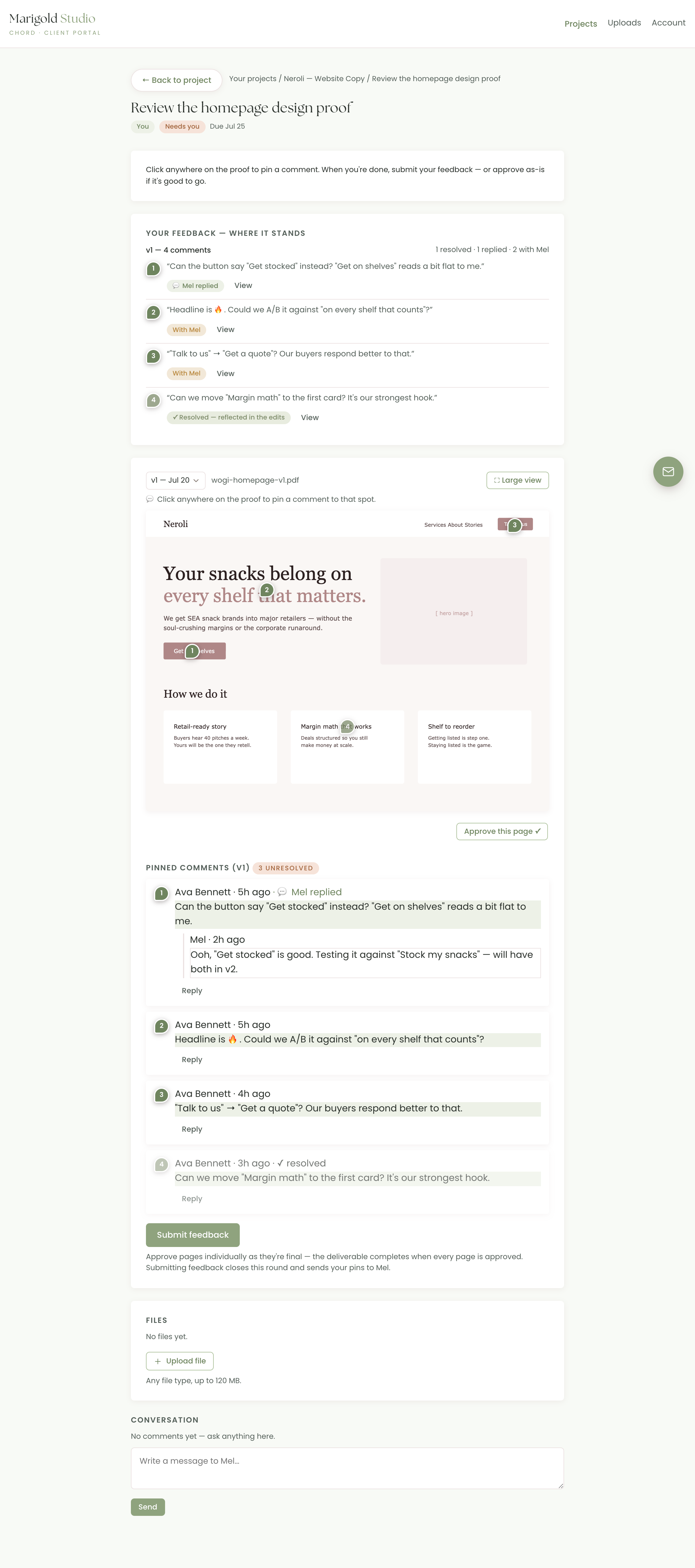
Share the actual design, page or draft in the portal. Your client pins comments exactly where they mean them, you reply and resolve in place, and approve page by page. And because you set the number of revision rounds up front, every submitted round is counted, so "just one more tweak" can't quietly become five.

  • Pin-comment proofing right on the design, so no more vague email feedback
  • Reply & resolve in place, and approve page by page
  • Revision rounds are counted, so each feedback round is logged, so scope creep can't sneak in
  • Bring your own tool too: attach a Figma, Framer or Drive link
portal · review the proof
A client pinning comments on a website design proof
What your client reviews · scroll it
Your brand, everywhere

It's your studio on every screen.

Add your logo, your colours and your fonts once, and Chord wears them everywhere your client works: the portal, the emails, the proposals, the contracts, the invoices. It's your studio front and centre, from first hello to final invoice.

  • Your logo & colour palette across every surface
  • Emails from your name, not from a tool
  • Your studio front and centre, not ours
Your brand kit
Client portal Emails Proposals Contracts Invoices
One brand kit · every surface
Where Chord is different

Made for the way creatives actually work.

Plenty of tools can send an invoice or store a contract. These are the parts built for you.

Capacity & income, built in.

The only client portal that also protects your time and forecasts your money. Say yes with confidence; plan your upcoming months with clarity.

Yours, not ours.

Your logo, colours and voice on the portal, the emails, the contracts and the invoices. Your brand runs the whole experience, not ours.

No hidden platform fees.

No per-client fees and no cut of what you invoice. One simple price for your plan.

Who it's for

Built for people who care about a premium client experience.

If functionality and beauty are equally important in the way you work, Chord is your answer.

Copywriters & content studios
Designers & brand studios
Web & development studios
Photographers & videographers
Consultants & coaches
Marketing & social freelancers

Not built for: high-volume e-commerce, appointment-only booking, or teams that never send a proposal. There are better tools for those.

How it works

Up and running in an afternoon.

Get started in just three steps.

1

Add your brand

Drop in your logo, colours, and pick your favourite font. Chord instantly wears them across the portal, emails and paperwork.

2

Invite your client

Send a one-click branded link. They open their portal. No password, no sign-up form to fill in.

3

Run the project

Send the proposal, get your agreements signed, and track every task in every stage, while Chord watches your capacity and income.

Pricing

Priced for every season of your business.

Founding pricing, locked in for early studios. Prices in Singapore dollars.

Starter

For studios just starting out or only work on a single project at a time.

S$9 / month
  • 1 active project
  • Branded client portal
  • Proposals, contracts & invoices
  • Workload & income view
Join the waitlist

14-day free trial on both plans · Founding price locked for life for the first 50 studios · Cancel anytime · Prices exclusive of applicable taxes.

Why I'm building Chord

The tool I wanted for my own studio.

As a copywriter and former designer, I've been searching for the perfect client portal and work management app for years. I've tried almost every tool you can think of out there — but they always ended up not being a good fit for what I wanted.

I was paying hundreds for separate things: a paperwork tool to take care of proposals and invoices, a project management tool for the tasks, not to mention endless email threads and feeling terrified that I'd dropped the ball somewhere because all the information wasn't consolidated in one secure place.

More than that, I was living in an exhausting feast-or-famine cycle. I could never predict how much income I was getting in a month, and I'd say yes to opportunities, forgetting that I was already overbooked. This led to the burnout and constant anxiety that so many creatives are familiar with.

Chord didn't begin in its current form; it started as a personal app to manage my workload capacity and forecast my income. Since then it has evolved into a whole dashboard where you can not only protect yourself, but also manage paperwork, tasks, communication and files, all in one place. It's the tool I wish I'd had when I started out.
M
Mel
Founder, Chord
Common questions

Frequently asked questions

Do my clients need an account?

Your client does need to log in to your portal for security, but it's as seamless as it gets. They get a one-click branded link by email that takes them straight into their portal, with no password to remember.

How does the capacity view work?

You give each task a rough time estimate; Chord adds them up across your active projects and shows how full each month is, so you can plan and say yes with confidence.

Will it look like my brand?

Yes. Your logo, colours and voice run across the portal, emails, contracts and invoices, so the whole experience feels like your studio.

How do payments work?

You can add your own bank transfer details, payment link (Stripe, Paypal Me etc), or even a QR code. Clients make payment and upload a screenshot, and you get a task to confirm payment. The receipt then goes out automatically once you mark it paid and your monthly income forecast is updated.

When can I get in?

We're opening to a first group of studios soon. Join the waitlist and you'll be among the first invited, with founding pricing locked in.

Can I bring my own contracts?

Absolutely. Use your own wording, or start from a discipline-specific template and edit. E-signatures are built in.

Launching soon
First 50 studios · founding price for life

Be first through the door.

Chord is opening to a first group of studios. The first 50 to join get founding pricing locked in for life. It never goes up, however much we add. Add your details and we'll send your invite when Chord launches.

Join the waitlist